Showing posts with label Java. Show all posts

26 September 2016

Write a program in Java to show all files and directory name of a given location


Solution: 
If you want to run this Java program, you have to do the following:
  • Step1: Your computer must have JDK installed to run and compile any Java program.
  • Step2: Create a file name DirfileList.java with the source code given bellow and save the file on any location on your computer.
  • Step3: Compile and  Run the java program to get the output.

 1
 2
 3
 4
 5
 6
 7
 8
 9
10
11
12
13
14
15
16
17
18
19
20
21
22
23
24
25
26
27
28
29
30
31
32
33
34
35
36
37
38
39
40
41
42
43
44
45
46
47
48
49
50
51
import java.io.File;
import java.util.ArrayList;
import java.util.List;

public class DirfileList {

    public static void main(String[] args) {
        // TODO code application logic here

        try {
            // Set directory path name 
            File path = new File("F:/test");

            // Get list of files
            File[] listOfFiles = path.listFiles();

            // Declare file name list
            List<String> file_names = new ArrayList<String>();

            // Declare directory name list
            List<String> dir_names = new ArrayList<String>();

            // Loop throw the files and directory name and store the names in List
            for (int i = 0; i < listOfFiles.length; i++) {

                if (listOfFiles[i].isFile()) {
                    file_names.add(listOfFiles[i].getName());
                } else if (listOfFiles[i].isDirectory()) {
                    dir_names.add(listOfFiles[i].getName());
                }
            }

            // Print file names
            for (String fName : file_names) {
                System.out.println("File:" + fName);
            }

            // Print directory names
            for (String dName : dir_names) {
                System.out.println("Directory:" + dName);

            }
        } catch (Exception e) {
            System.out.println("!! Error:" + e.toString());
        }

    }

}

Java: A Beginner's Guide, Sixth Edition

01 June 2016

What is JavaServer Faces (JSF) in Java programming language ?

  • JSF is a component-based MVC(Model View Controller) framework which enables you to completely separate Java code from HTML pages. 
  • It is a new technology for developing server-side Web applications using Java.
  • For example: to display a table with rows and columns you can add a table component to a page, there is no need to write html table , tr ,td tags with loop structure to show table data in JSF.


  • JSF has the following parts:
  • A set of user interface components(HTML tags, form, table, JSF component)
  • An event-driven programming model
  • A component model that enables third-party developers to supply additional components
  • The application developed using JSF is easy to debug and maintain.

Core JavaServer Faces (3rd Edition)
Mastering JavaServer Faces (Java)

21 April 2016

What is Polymorphism in OOP ?

  • Polymorphism (from Greek, meaning “many forms”) is the mechanism that allows one interface/method/function/procedure to access a general class of actions.  
  • More generally, the concept of polymorphism is often expressed by the phrase “one interface,  multiple methods.” 
  • This means that it is possible to design a generic interface to a group of related activities.
Polymorphism

  • Polymorphism helps reduce complexity by allowing the same interface to be used to specify a general class of action.

PolymorphismSams Teach Yourself C++ in One Hour a Day (7th Edition)

What do you mean by encapsulation in OOP ?


  • Encapsulation is a programming mechanism that binds together code and the data it manipulates and apply restricting access to some of the object's components. 
Encapsulation


  • In an object-oriented language, it is a language construct that facilitates the bundling of data with the methods or other functions operating on that data. 
  • Class (extensible program-code-template for creating objects) is used to ensure encapsulation of data and method in Object Oriented Programming.

Intro to Java Programming, Comprehensive Version (10th Edition)
Java: How to Program, 9th Edition (Deitel)

What is Java Bytecode ?


Java Bytecode
  • When a Java program source is compiled, the output of the Java compiler is called bytecode. 
  • Many language generate executable code after compilation. 
  • In Java the output is converted to a special type of file which is called the bytecode.
  • Bytecode is a highly optimized set of instructions designed to be executed by the Java run-time system,which is called the Java Virtual Machine (JVM). 
  • Bytecode makes it much easier to run a program in  a wide variety of environments because only the JVM needs to be implemented for each  platform.


Java: A Beginner's Guide, Seventh Edition

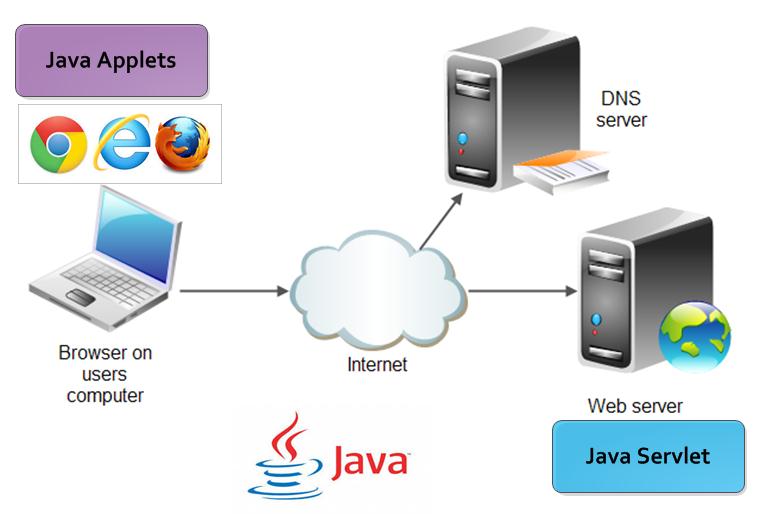
What is Java Applets and Java Servlet ?


Java Applet
  • An Java applet is a special kind of small Java program that is designed to be transmitted over the Internet and automatically executed by a Java-compatible web browser. 
  • Applet are typically used to display data provided by the server, handle user input, or provide simple functions, such as a loan calculator, that execute locally on client machine, rather than on the server.
  • An applet is downloaded on demand, without further interaction with the user. 
  • When a user clicks a link that contains an applet, the applet will be automatically downloaded and run in the browser.
    Java Applets and Java Servlet
 Java Servlet:
  • A servlet is a small program that executes on a server. 
  • Servlets dynamically extend the functionality of a web server and applets dynamically extend the functionality of a web browser. 
  • Java spanned both sides of the client/server connection with Applet and Servlet.


Java: The Complete Reference, Tenth Edition (Complete Reference Series)

20 April 2016

How Java is relates to C, C++ & C# programming language

  • Java programming language syntax come from C programming language. 
  • Java language object model is adapted from C++ programming language. 
  • Java also inherits design philosophy from C/C++.
  • Although Java was influenced by C++, it is not an enhanced version of C++. 
  • Java has many distinct features than C/C++.
  • Microsoft developed the C# (C- Sharp) language after few years of the creation of Java &  C# is closely related to Java.
    Java,C,  C++ & C# programming language
  • Many of C#’s features directly parallel Java. 
  • Both Java and C# share the same general C++-style syntax, support distributed programming, and utilize the same object model. 
  • There are, of course, differences between Java and C#, but the overall “look and feel” of these languages is very similar.

Java All-in-One For Dummies (For Dummies (Computers))

What is Java (programming language)

  • Java is a general-purpose,powerful and versatile computer programming language for developing software  running on mobile devices, desktop computers, and servers.
  • Java was developed by a team led by James Gosling at Sun Microsystems. 
  • Sun Microsystems was purchased by Oracle in 2010. 
  • Originally called Oak,Java was designed in 1991 for use in embedded chips in consumer electronic appliances. 
  • In 1995, renamed Java, it was redesigned for developing Web applications.
  • The Java programming language is well known for the following reason:
  • Java is Simple and easy to learn, 
  • Object oriented, 
  • Distributed,
  • Interpreted, 
  • Robust, 
  • Secure, 
  • Architecture neutral, 
  • Portable, 
  • High performance, 
  • Multi-threaded, and dynamic.
Java: A Beginner's Guide, Sixth Edition

Featured Post

How to Write PHP code and HTML code within a same file

A PHP file can have both PHP code and HTML code together. Any HTML code written outside of PHP <?php //php code here… ?> Code is ig...

Popular Posts